
 MVP Profile
 Try my app HoloATC!
  HoloLens 2
 Magic Leap 2
 Meta Quest
 Android phones
 Snap Spectacles
 MetaLense 2
 Buy me a drink ;)
 BlueSky
 Mastodon
 Discord: LocalJoost#3562
Fix: Unity fails to build a HoloLens 2 app because Burst compiler failed running
Yes, people are still building HoloLens apps these days because replacement devices are few and far between, and enterprises are still using them, too. Recently I had a computer repaved, installed Unity 6000.0.49f1 (the last release to support HoloLens 2), and installed the Visual Studio workloads using a .vsconfig file I had exported earlier. Then I tried to build the Visual Studio C++ UWP solution and was confronted with this quite long error:
Building Library\Bee\artifacts\UWPPlayerBuildProgram\AsyncPluginsFromLinker failed with output:
UnityEditor.Build.BuildFailedException: Burst compiler (59eb6f11d242) failed running

stdout:
Starting 1 library requests
Error: Burst internal compiler error: Burst.Compiler.IL.Aot.AotLinkerException: Burst requires Visual Studio 2017 or greater (in addition, the following Visual Studio components need to be installed via the Visual Studio Installer: (1) the "Windows Application Development > Universal Windows Platform tools" workload, (2) "C++ Universal Windows Platform support for vNNN build tools (ARM64)", (3) "MSVC vNNN - VS NNNN C++ ARM build tools (Latest)", and (4) "MSVC vNNN - VS NNNN C++ ARM64 build tools (Latest)") in order to build a standalone player for UWP with THUMB2_NEON32
Unable to find a valid linker at 'C:\Program Files\Microsoft Visual Studio\18\Enterprise\VC\Tools\MSVC\14.51.36231\bin\Hostx64\arm\link.exe'
   at Burst.Compiler.IL.Aot.AotNativeLink.ValidateExternalToolChain(AotCompilerOptions options)
The weird thing is - on my desktop machine I had no problems. After trying a lot of things and a long conversation using Claude Code as a sparring partner, I found out you had to change the setting “Target 32 bit CPU architecture”, which is set to “Everything” by default, to “Nothing”.
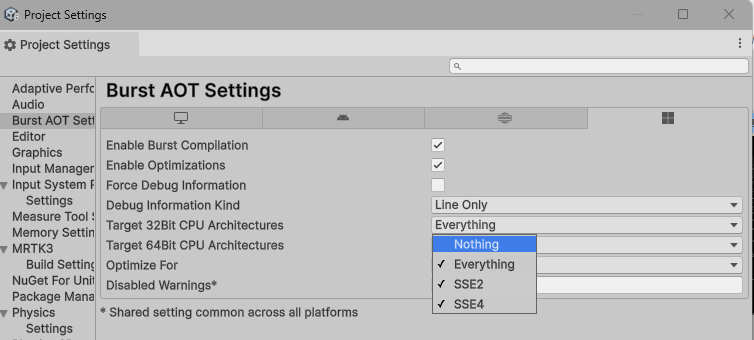
And that’s all.
The rationale is that Unity, by default, compiles native libs for all enabled CPU targets. This includes 32-bit ARM for UWP. But apparently, at some point Visual Studio dropped support for that. This makes sense, as the 32-bit architecture was only supported by HoloLens 1, a few early Windows 8 tablets and some Windows Phones, all of which have long since disappeared. However, Unity doesn’t know that and dutifully tries to compile native libraries for 32-bit, failing in the process. As long as that happened on a machine that still had the old SDKs installed, this was not an issue. But on a newer machine that can’t download those out-of-support SDKs anymore, you run into the issue I encountered.
If you turn the 32-bit option off, you will see changes in BurstAotSettings_WSAPlayer.json and CommonBurstAotSettings.json, and if you commit those, your issues are over forever. Or at least, as long as HoloLens 2 is supported.
No code this time as there is no code to share.